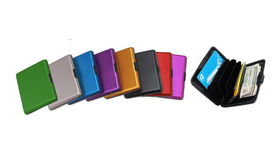
1 - Aluminum Wallet
$5.95
Loading…
$13.95 - In stock
Select your options to add to cart.
Estimated delivery: loading…
How do I connect the keyboard?
Plug the USB cable into your computer's USB port. Connect the mouse USB cable to another USB port. Device auto-recognized; no drivers needed.
Is the keyboard compatible with Windows and Mac?
It connects via USB, compatible with standard computers.
How do I clean the keyboard?
Wipe keys with a soft cloth and mild soap. Avoid spills on keys to prevent sticking.
Can I adjust the mouse sensitivity?
Adjust mouse sensitivity in your operating system's settings.
Are the keys spill-resistant?
Avoid spills on keys to prevent sticking. No spill-resistant coating is explicitly stated.
What if the mouse isn't detected?
Try a different USB port. Unresponsive keys: check for debris under keys. Mouse cursor erratic: clean sensor on bottom.
Is the mouse optical?
Yes, standard optical mouse for precise navigation.
Check out these related products
No reviews yet. Be the first to review!